—
You can check an email address against known breach records using Have I Been Pwned. If a result appears, read which service was affected and what information was exposed before deciding what to change.
An email address appearing in a breach does not automatically mean someone entered your inbox. A shop, forum, or other service may have exposed the address you used to register there. The risk depends on the rest of the record, especially whether a password you still use was involved.
Check through the genuine breach-notification service
Open Have I Been Pwned directly, enter your own email address in its email search, and run the check. Read the breach history shown for that address. Repeat for another address you use if you want to review its exposure separately.
The email-search form does not require your mailbox password. Do not give an unfamiliar “breach checker” your email login, verification code, or recovery code. Checking an address and signing into an email account are different operations.
HIBP also offers notifications. If you choose monitoring, follow its verification process through the genuine site. Avoid posting screenshots of personal results publicly; they can reveal services associated with your address.
Mozilla is another established source of breach alerts. Its current service notice says core Mozilla Monitor breach features remain available after Monitor Plus closed. This walkthrough uses HIBP so there is one clear process to follow.
Read the result before reacting
For each incident, review these details:
| Detail | Why it matters |
|---|---|
| Affected service | Identifies the account or organization to investigate. |
| Breach date | Helps distinguish a historical incident from a recent one. |
| Exposed data types | Names, contact details, passwords, or financial information call for different responses. |
| Password involvement | Makes password reuse and the timing of your last change particularly relevant. |
| Your current use of the service | Helps decide whether to secure an active account or close an unused one. |
HIBP's breach-data documentation distinguishes the incident date from when a record was added and lists the kinds of data involved. A newly added record can describe an older event.
Read the description too. A list of exposed data categories does not establish that every listed field was present for every affected person. Where available, compare it with the affected company's official incident notice, reached independently.
Separate address exposure from account compromise
There are three different situations to understand:
-
Your address was exposed: Another organization held your contact information. Its breach alone does not demonstrate access to your mailbox.
-
A service password was exposed: That service's login may be at risk, along with other accounts using the same password.
-
Your email account was accessed: Unrecognized security activity, messages, or recovery changes require the email provider's account-security process.
For example, an old forum breach could include the address you still use, while its forum password has already been replaced. That result remains relevant history, but it is different from discovering an unknown recovery address in your email account today.
The FTC's account-recovery guidance describes signs of actual takeover and the importance of protecting email because it receives password-reset messages. If you see those signs, prioritize the provider's recovery and security tools rather than waiting for another breach search.
Take action in a practical order
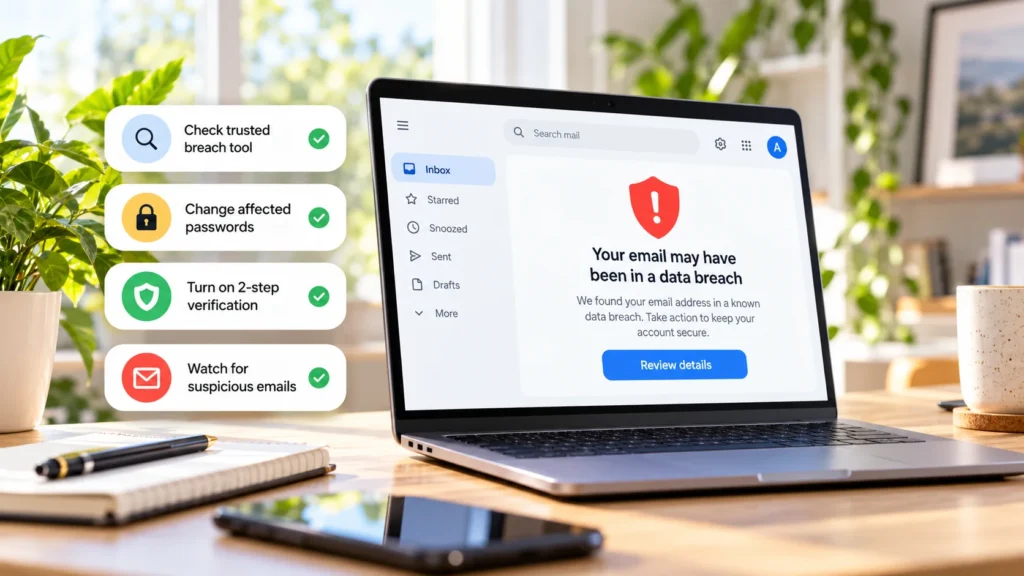
First, secure the affected service. If an active account's password was exposed or the provider instructs you to replace it, open the real service and change it. Consider whether an earlier password change already addressed the incident; an address-only record is not proof that your current password leaked.
Next, replace reused passwords elsewhere. Start with email, financial services, and other important accounts. Do not reuse the replacement or make a small variation of the exposed password. The FTC recommends changing exposed passwords and reused or similar ones.
Add an appropriate second factor. Enable two-factor authentication where supported, and keep recovery options accessible before finishing setup.
Review recovery details. Confirm that recovery email addresses and phone numbers belong to you and are current. Investigate unfamiliar changes through the real service.
Watch for convincing follow-up scams. Leaked names, phone numbers, and service details can make a message seem familiar. Recognizing those details is not evidence that the sender is legitimate.
Close unused accounts deliberately. Save anything needed and review linked services, purchases, and deletion consequences first. Closing an account does not retrieve information already leaked, but it can reduce what you leave with an unused service.
Use unique passwords to contain future damage
A password manager can help generate and store a different password for each account. If one company loses a password, uniqueness prevents that same secret from being a ready-made login for your other accounts.
If you use Google's tools, our guide to Google Password Manager explains finding saved entries and reviewing them. Remember that changing a saved entry is not the same as changing the password at the service itself.
A manager cannot prevent a company from being breached or remove personal data from a stolen database. Its role here is to make strong, separate account credentials practical to maintain.
Understand what a clean result cannot prove
HIBP's FAQ explains that its records do not cover every breach. Incidents may be undiscovered or unavailable to the service, and some sensitive records require verified access. A clean public search is useful information, not a certificate that your accounts have never been exposed.
Historical entries can also remain after you change a password. Checking again is not a test of whether that password change succeeded; confirm the change at the actual service.
Treat any later breach alert as information to verify, not a reason to follow an urgent message link. The FTC advises using a known website or contact route when a message is suspicious. Receiving spam alone does not prove that a particular incident caused it.
Use the result to identify the affected service, contain password reuse, and address the data actually exposed. That is more useful than changing unrelated settings simply because your email address appears in an old record.