—
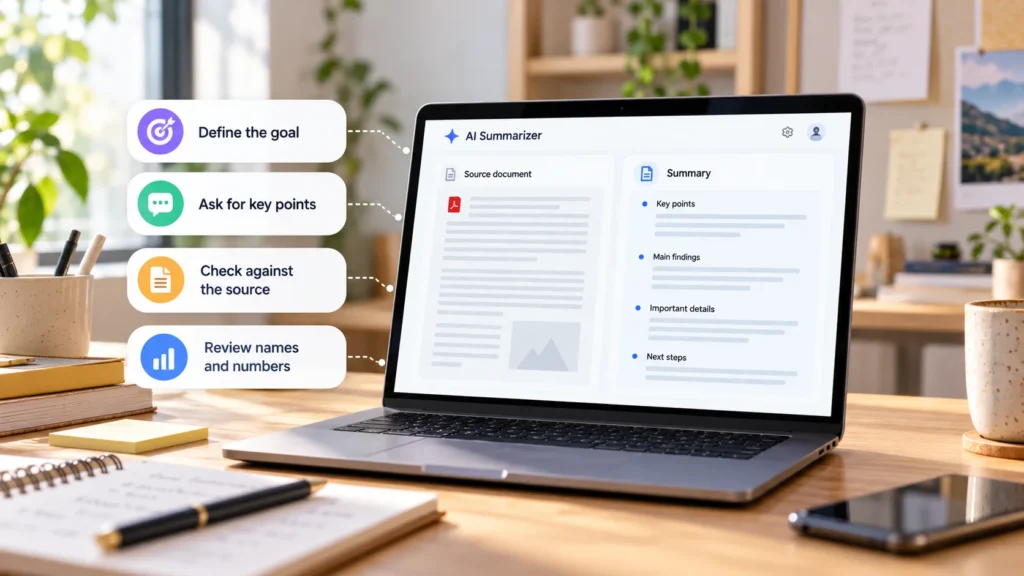
To use AI to summarize a document reliably, start with a structured overview, extract important details separately, and compare the resulting claims with the source. Asking immediately for the shortest possible summary makes it harder to notice what was left out.
The output is a working draft, not a guaranteed substitute for reading material that affects an important decision. The workflow below helps you find omissions and unsupported statements before sharing the summary.
Choose the summary that matches the job
Tell the tool who will read the result and what they need to do with it. A manager deciding whether to approve a project needs different information from a colleague implementing it.
| Summary type | Useful when you need |
|---|---|
| Executive summary | The purpose, main findings, implications, and open decisions |
| Bullet summary | A compact list of the main points |
| Section-by-section summary | Coverage that follows the original structure |
| Action-item extraction | Tasks, owners, deadlines, and dependencies |
| Comparison table | Differences between options described in the source |
| Question-focused summary | An answer to a defined question, such as what changed |
For a long or unfamiliar document, start section by section. You can compress it after checking coverage. If you only need action items, say so, but do not assume every recommendation in the document is an assigned task.
Prepare a suitable source and sharing environment
Confirm the document's version, date, and completeness. A polished summary of an outdated draft can still be the wrong document for the job. Keep the original open while you work.
Before uploading, review sensitivity and your authority to share it. Remove unnecessary personal or confidential information and use an approved account for work material. Check the product's data controls and retention terms where relevant; OpenAI's data-controls guidance explains that training preferences and deleting content are separate matters.
Upload a supported file or paste clearly labelled sections. ChatGPT's file-upload documentation describes document summarization and extraction, while noting that embedded-image handling depends on the plan and file type. A successful upload does not establish that every chart was understood. For tool selection, compare ChatGPT and Gemini.
Establish coverage before compressing
Ask for the document structure first:
> List the headings and appendices you can identify. Flag unreadable or apparently missing sections. Use only this document.
Compare that list with the original contents and page sequence. The model's own list is not proof that it read everything; it gives you something concrete to check.
Then request a first pass:
> Summarize each section in 2–3 bullets. Preserve decisions, qualifications, and unresolved questions. Do not infer missing information.
If the document is too large to handle well, work through labelled sections while keeping their order and references. Google's Gemini file guidance warns that large inputs exceeding the context window can lead to missed details or connections. Split at section boundaries and retain headings so you can recombine the results accurately.
When combining section summaries, ask the tool to retain contradictions or dependencies rather than silently resolving them. Check cross-references against the original.
Extract critical details in a separate pass
Use a checklist suited to the document, rather than relying on whatever fits into a narrative summary:
> List every date, number, deadline, and decision you can identify, with its section reference. Separately list risks, exclusions, and action items. Flag anything uncertain instead of guessing.
For action items, request columns for task, owner, deadline, and source location. Require “not stated” when an owner or date is absent. Compare the extracted details with dates and figures you marked during your initial read.
Preserve the meaning around the details. A proposed launch is not an approved launch. A spending ceiling is not an amount already spent. An illustrative example is not necessarily a recommendation.
Keep distinctions such as “must,” “may,” and “subject to approval” visible. Ask for recommendations and final decisions in separate groups if the document contains both.
Check tables, charts, scans, and footnotes visually
Scanned pages may need optical character recognition, or OCR, to turn images of text into usable text. Poor scans can produce incorrect words or numbers. Adobe documents how OCR errors need review; clean-looking output alone is not evidence that recognition was accurate.
Open important tables and compare row labels, column headings, totals, units, and any negative signs. For charts, inspect the axes, legend, time period, and source notes. A figure that describes one subgroup should not become a claim about everyone.
Read appendices and footnotes that qualify the main findings. If the tool cannot interpret a visual, provide an authorized, readable extract or handle that part manually. Do not ask it to fill gaps from what such documents usually say.
Trace important claims back to the document
Where the tool supports source references, ask for page or section locations beside important statements. Distinguish printed page numbers from the PDF viewer's page count when they differ.
For a claim that seems stronger or more specific than the source, ask:
> Show me where this appears in the source. If it is your inference, label it as an inference.
Then open that passage yourself. AI can produce a plausible statement or citation that is not supported by the document. OpenAI's accuracy guidance explicitly warns about incorrect facts and fabricated references.
Check numbers, dates, names, obligations, financial terms, and medical claims against their complete source context. For consequential material, retain review by the responsible professional rather than treating the summary as legal, financial, or medical authorization.
Refine for the reader after verification
Once the structured draft is sound, ask for the intended format:
> Turn this checked summary into a short briefing for the project team. Keep deadlines, decisions, risks, and unresolved questions. Do not add new claims.
Compare the shortened version with your checked detail list. Include the document title, version or date, and a reference to the source so readers can return to it.
For routine reading, a brief overview may be enough. For work involving decisions, keep the critical-detail table alongside the readable summary. That gives readers both a quick orientation and a route back to the evidence.